

CITI Training
Instructions to Register and Complete CITI Training
-
Log into CITI: Copy and paste the following URL into your web browser:
https://www.citiprogram.org


-
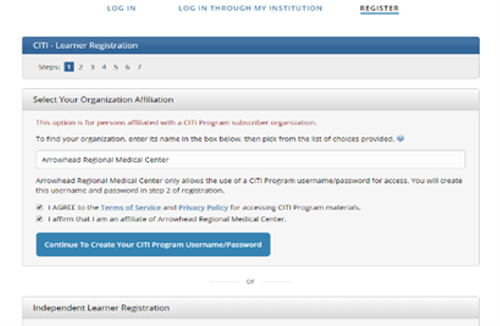
Affiliate with ARMC (Step 1): Click Register and type in ‘Arrowhead Regional Medical Center’
in the Select your Organization Affiliation box. Agree to Terms of Service
and Privacy Policy and affirm you are an ARMC affiliate. Then Click ‘Continue
to Create your CITI Program Username/Password.’
- Complete Registration (Steps 2-4): Enter your name and email. Then, create username, password, and security question and answer. Last, enter your country of residence.
-
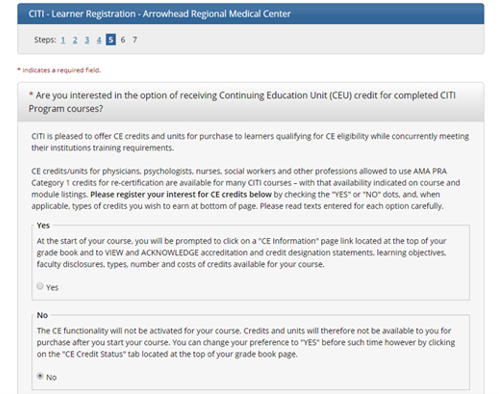
Continuing Education Units (Step 5): Indicate whether you wish to receive Continuing Education Unit (CEU) credit
for completed CITI Program courses and type of CEU, and survey/marketing emails.
-
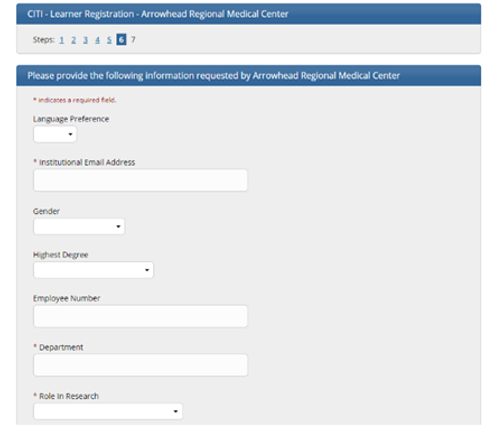
ARMC Information (Step 6): Enter your institutional email address, department, role in research, etc.
-
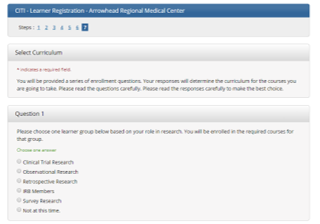
Select Curriculum (Step 7): Select curriculum based on the type of research you will be conducting at ARMC.
For a Retrospective/Case Study/Observational/Survey/ Qi, completion of any one of the following courses is sufficient to meet our requirement.- Retrospective Research
- Observational Research
- RCR Basic Course
- GCP for Clinical Trials with Investigational Drugs and Medical Devices (U.S. FDA Focus)
-
Clinical Trial Research
If you are planning to get involved in a clinical trial study, then you must finish the Clinical Trial Research course
-
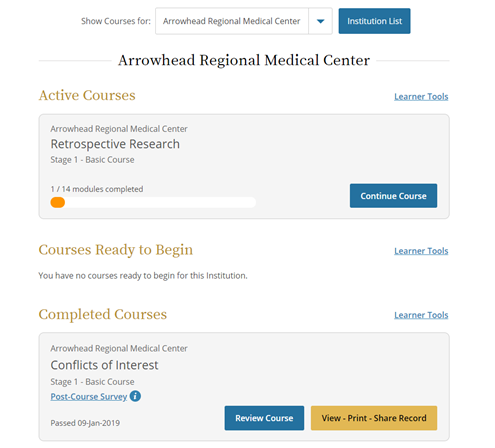
View/Complete CITI Courses: Once you log in to your CITI Account you will click on ‘Arrowhead
Regional Medical Center’ to view your selected course(s). Click
on the course title to complete the required modules. You can stop and
resume the training between modules and CITI will save your work.
Once the course has been completed and passed (must score a minimum of 80%), you will be able to ‘View-Print-Share Record’ and it will move into the ‘Completed Courses’ section.
Most courses are valid for a 3 year period. If additional courses are required by the ARMC IRB, they will be assigned to your CITI account and you will receive notification via your ARMC email.
For further assistance, contact the ARMC Office of Research and Grants/ IRB at: ARMC-IRB@armc.sbcounty.gov or 909-580-6336